Google Maps is rolling out landmark-based navigation and Gemini-powered Lens for improved directions.

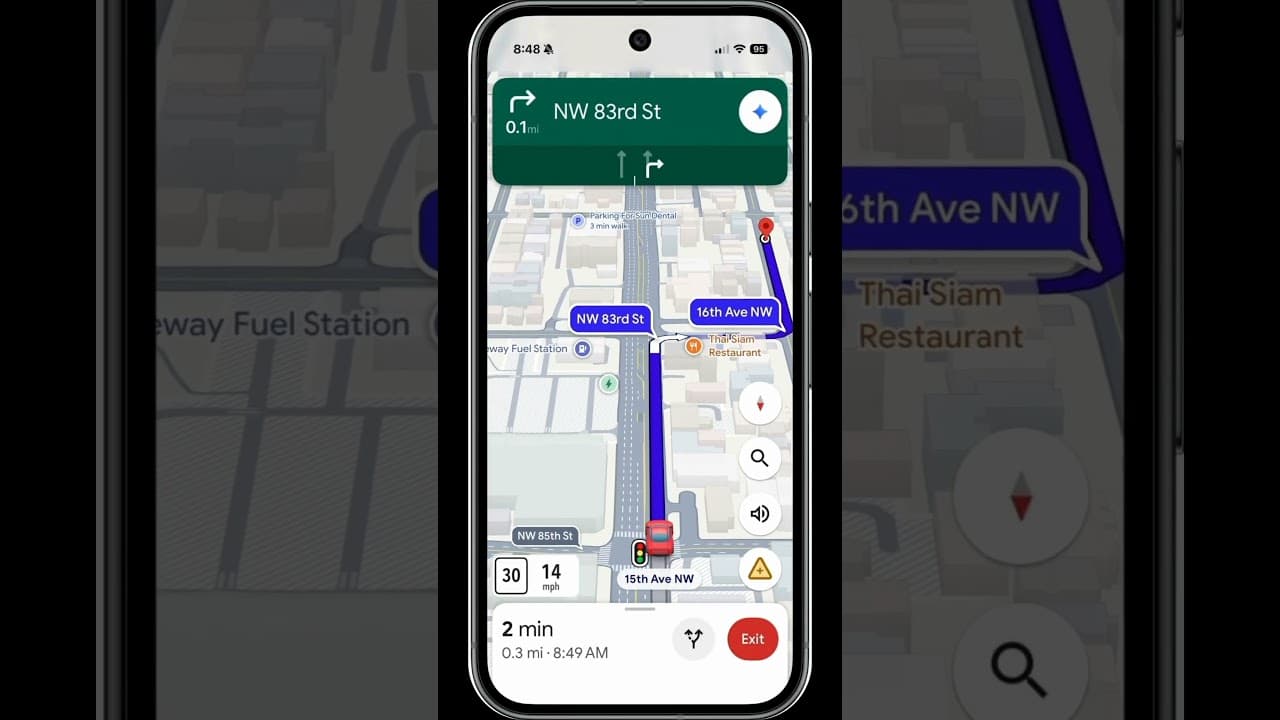
Google Maps just got a lot more human and a little more like your friend riding shotgun.
Following the recent introduction of Live Lane Guidance and testing of a Power Saving Mode, Google has started to release landmark-based navigation and a Gemini-enhanced edition of Google Lens, allowing users to interact with their surroundings in a more intuitive way.
The new landmark-based navigation, which is being rolled out to Google Maps for Android and iOS users in the US, changes how Maps provides directions. Instead of relying on street names or distance, the app will now use recognizable locations like gas stations, cafés, and buildings.
Maps will now provide directions such as "turn right after the Thai Siam Restaurant" rather than "turn right in 500 feet." As you get closer, these landmarks will also appear visually on your route.
Behind the scenes, this upgrade is powered by Gemini’s visual comprehension. Google uses Street View imagery and its database of over 250 million mapped locations, filtering out hard-to-see structures to ensure that only easily identifiable locations are used. The goal is to provide directions that feel more like advice from a local than a robotic system.
Gemini also enhances Google Lens within Maps.
The second significant addition is an AI-enhanced Lens powered by Gemini's multimodal capabilities. Users can point their camera at a building or location from the Maps search bar and ask questions such as:
“What is this place and why is it popular?”
“What’s the vibe inside?”
“Do they take walk-ins?”
Gemini will then provide context-aware responses based on business data, photos, and Maps reviews. The feature will be released gradually in the US later this month on Android and iOS.
Smarter Maps for the AI age
It is encouraging to see Google adding improvements to Maps that improve the user experience, especially given how stagnant the app has been. The company recently launched Live Lane Guidance, which uses a car's built-in AI and front camera to help drivers merge safely on highways by visually analyzing lane markings and road signs. Previously, a Power Saving Mode was spotted in beta, which displays only essential route information in grayscale to conserve battery life.
The addition of these features is gradually changing Google Maps from a passive navigation tool to an AI-driven driving assistant. The question is how much we can rely on this new version and how effectively it will function once it is released.
Hopefully, Google will include a toggle that allows users to revert to the classic navigation style. Cars have become increasingly complex, frequently offering "solutions" to non-existent problems. The last thing we need is for our favorite navigation app to follow suit.